API Authentication
Our API uses token-based authentication to secure endpoints. This guide covers everything you need to know about authenticating your API requests.
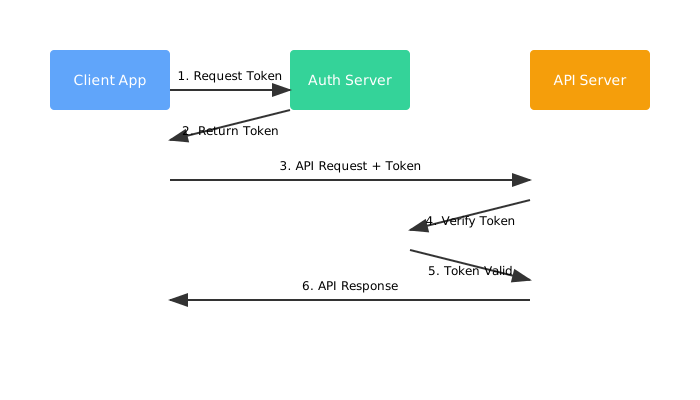
Authentication Methods
We support three authentication methods:
API Keys
Best for server-to-server communication
OAuth 2.0
Ideal for third-party integrations
JWT Tokens
Perfect for client applications
Using API Keys
Generating an API Key
Generate an API key from your dashboard:
- Log in to your account dashboard
- Navigate to Settings → API Keys
- Click "Generate New Key"
- Copy and securely store your key
Security Warning
API keys are shown only once. Store them securely and never expose them in client-side code.
Making Authenticated Requests
Include your API key in the Authorization header:
curl -X GET https://api.techdocs.com/v1/users -H "Authorization: Bearer YOUR_API_KEY" -H "Content-Type: application/json"JavaScript example:
const response = await fetch('https://api.techdocs.com/v1/users', {
  headers: {
    'Authorization': 'Bearer YOUR_API_KEY',
    'Content-Type': 'application/json'
  }
});

const data = await response.json();
OAuth 2.0 Flow
Authorization Code Flow
The OAuth 2.0 authorization code flow is recommended for web applications:
- Redirect user to authorization URL:
https://auth.techdocs.com/oauth/authorize?
  client_id=YOUR_CLIENT_ID&
  redirect_uri=YOUR_REDIRECT_URI&
  response_type=code&
scope=read%3Ausers%20write%3Adata- Exchange authorization code for access token:
POST https://auth.techdocs.com/oauth/token
Content-Type: application/json

{
  "grant_type": "authorization_code",
  "code": "AUTHORIZATION_CODE",
  "client_id": "YOUR_CLIENT_ID",
  "client_secret": "YOUR_CLIENT_SECRET",
  "redirect_uri": "YOUR_REDIRECT_URI"
}
JWT Tokens
Token Structure
Our JWT tokens contain three parts:
- Header: Algorithm and token type
- Payload: User data and claims
- Signature: Verification signature
// Decoded JWT payload example
{
  "sub": "user_123",
  "name": "John Doe",
  "email": "john@example.com",
  "iat": 1516239022,
  "exp": 1516242622,
  "scope": ["read_profile", "write_data"]
}
Token Refresh
Refresh expired tokens using the refresh endpoint:
POST https://api.techdocs.com/v1/auth/refresh
Content-Type: application/json

{
  "refresh_token": "YOUR_REFRESH_TOKEN"
}
Rate Limiting
API requests are rate limited based on your plan:
| Plan | Requests/Hour | Burst Limit |
|---|---|---|
| Free | 1,000 | 50/min |
| Pro | 10,000 | 500/min |
| Enterprise | Unlimited | Custom |
Error Responses
Authentication errors return appropriate HTTP status codes:
{
  "error": {
    "code": "INVALID_TOKEN",
    "message": "The provided authentication token is invalid",
    "status": 401
  }
}
Best Practices
- Rotate API keys regularly
- Use environment variables to store credentials
- Implement token refresh logic for long-running applications
- Monitor API usage in your dashboard
- Use HTTPS for all API communications